
Once you hire your first employee, you’re managing schedules, hours, time off, onboarding paperwork and records, on top of running the business. HR software keeps all of that organized, and several good tools are free for small teams.
This guide reviews the best free HR software in 2026, explains what each free plan includes, and covers what free tools usually don’t do (most notably, payroll), plus the HR basics every small employer needs.
Quick picks
Table of Contents
| Tool | Free plan in brief | Best for |
|---|---|---|
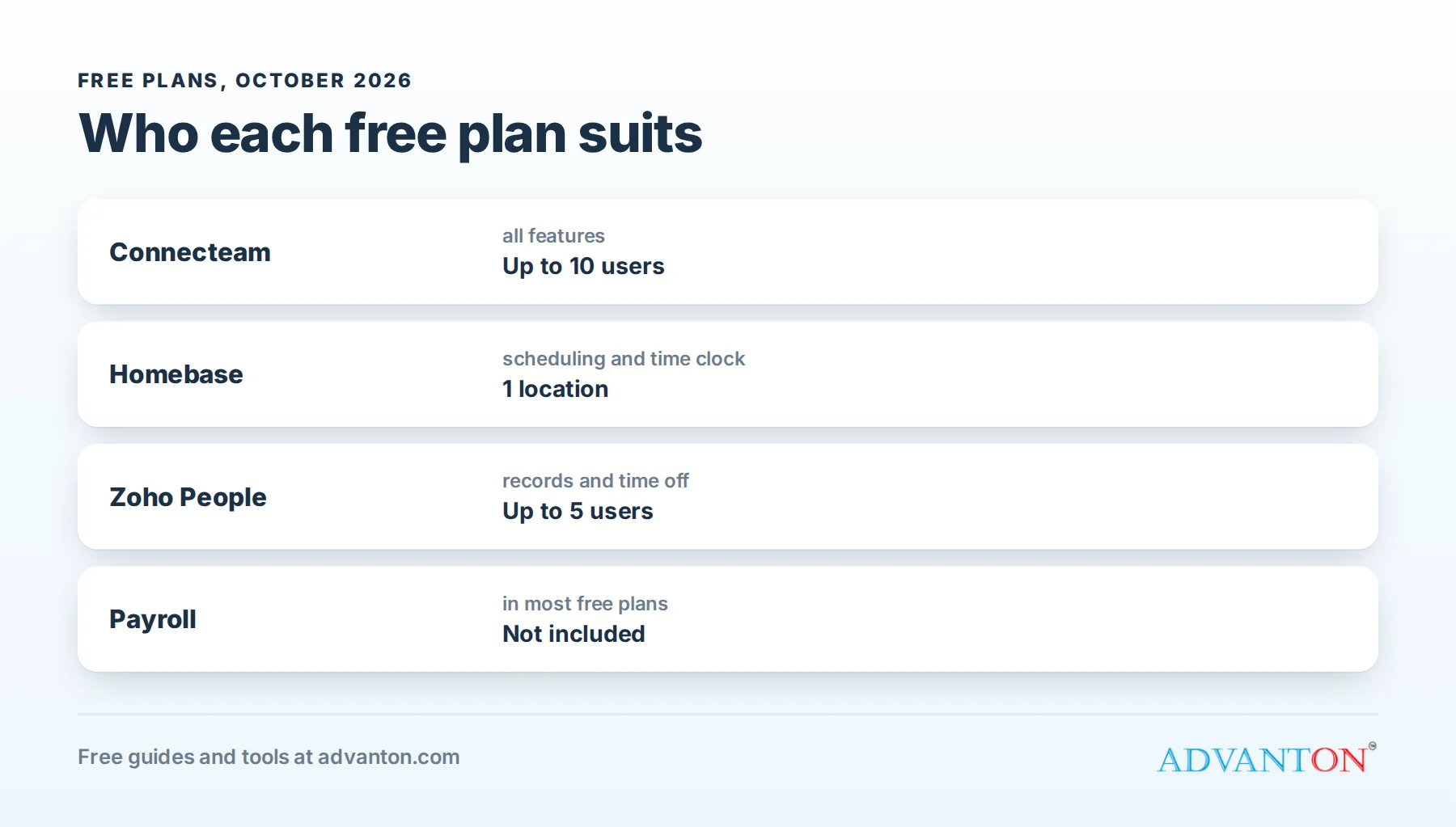
| Connecteam | Free for up to 10 users, with all features | Deskless and field teams |
| Homebase | Free for one location: scheduling, time tracking, messaging, hiring | Hourly teams at one location |
| Zoho People | Free for up to 5 users | Employee records and time off |
| OrangeHRM | Free open-source edition you host yourself | Teams with technical help |
Usually not free: payroll. Most free HR plans don’t run payroll; you’ll need a payroll service or accountant.
How we evaluated
We compared free-plan limits (users and locations), core HR features (records, time off, onboarding, documents), scheduling and time tracking, mobile apps, ease of use and upgrade costs. Limits come from current 2026 sources and change; check each vendor’s pricing page.
The best free HR software, reviewed
1. Connecteam: all-in-one for small teams
Connecteam’s Small Business Plan is free for up to 10 users and includes its full feature set: time clock with GPS, scheduling, task management, forms and checklists, team chat, training and onboarding, and HR records.
The catch: once you pass 10 users (including archived users), you need a paid plan.
Choose it if: your team works in the field or on the move, such as cleaners, contractors and landscapers.
2. Homebase: scheduling and time tracking for hourly teams
Homebase’s free Basic plan covers one location with scheduling, time clock, team messaging and hiring tools. Its employee limit on the free plan has changed over time and is reported differently by different sources, so check the current limit.
The catch: one location only, and HR and payroll features are paid.
Choose it if: you run a restaurant, shop or salon with hourly staff at one site.
3. Zoho People: employee records and time off
Zoho People offers a free plan for up to 5 users, with employee records, time off and attendance basics, plus integration with other Zoho tools.
The catch: a small user limit and fewer features than paid tiers.
Choose it if: you have a small office team and want organized records and leave tracking.
4. OrangeHRM: open source
OrangeHRM’s Starter edition is free and open source, covering employee records, leave, time and recruitment basics, but you host and maintain it yourself.
The catch: you need technical skills or help to install, secure and update it.
Choose it if: you have IT support and want full control of your data.
Comparison at a glance
| Connecteam | Homebase | Zoho People | OrangeHRM | |
|---|---|---|---|---|
| Free limit | 10 users | 1 location | 5 users | Self-hosted |
| Scheduling | Yes | Yes | Limited | Limited |
| Time clock | Yes (GPS) | Yes | Attendance | Yes |
| Time off | Yes | Limited | Yes | Yes |
| Onboarding | Yes | Hiring tools | Limited | Limited |
| Payroll | No | Paid | No | No |
| Best for | Field teams | Hourly, one site | Office records | Technical teams |
Which should you choose?
- Field or mobile team under 10 people: Connecteam.
- Hourly staff at one location: Homebase.
- Small office, records and time off: Zoho People.
- Technical team wanting self-hosting: OrangeHRM.
What free HR software usually doesn’t cover
- Payroll: calculating pay, withholding taxes and filing payroll tax returns usually requires a paid payroll service or accountant.
- Benefits administration: health insurance and retirement plans.
- Legal compliance advice: software helps with records, but it doesn’t replace understanding your obligations.
See our free hiring cost calculator to estimate the full cost of an employee, including payroll taxes.
HR basics every small employer needs
| Task | What to do |
|---|---|
| Classify workers correctly | Employees and independent contractors are treated differently for taxes and labor law |
| Verify work eligibility | Complete Form I-9 for every new employee |
| Collect tax forms | Form W-4 for federal withholding, plus any state forms |
| Report new hires | States require employers to report new hires to a state agency |
| Register for state taxes | Including state unemployment insurance |
| Get workers’ comp insurance | Required in most states once you have employees |
| Post required notices | Federal and state labor law posters |
| Track hours | Accurate time records, especially for hourly, non-exempt employees |
| Keep records | Personnel, payroll and time records for the required periods |
Requirements vary by state; your state labor department and a payroll provider can help.
Hiring with free tools
- Write a clear job ad with duties, pay range, schedule and how to apply; see best free AI writing tools for drafting help.
- Post it on free job boards, your website, social media and local community groups.
- Track applicants in your HR tool’s hiring feature or a simple spreadsheet: name, date, stage and notes.
- Use the same interview questions for every candidate, so comparisons are fair.
- Check references before making an offer.
- Send a written offer with pay, schedule, start date and any conditions.
Contractor or employee?
The IRS looks at three areas when deciding whether a worker is an employee or an independent contractor: behavioral control (do you control how the work is done?), financial control (who provides tools, sets pay and bears profit or loss?), and the relationship (is there a contract, benefits, and is the work ongoing and central to your business?). State rules can be stricter. When in doubt, check IRS guidance or ask a professional; misclassification can bring back taxes and penalties.
Onboarding: a simple first-week checklist
- Before day one: offer letter, start details, tax and eligibility forms, accounts and equipment ready.
- Day one: welcome, tour, introductions, safety training, policies and the employee handbook.
- First week: shadowing, training checklists, first tasks, and a check-in at the end of the week.
- First 90 days: regular feedback and a review conversation.
Most free HR tools let you build onboarding checklists and store signed documents.
Scheduling and time tracking tips
- Publish schedules early so staff can plan.
- Use a mobile time clock to record accurate hours.
- Set overtime alerts to control costs and follow overtime rules.
- Let staff request time off and swap shifts in the app, with manager approval.
A worked example: a café with eight staff
A café owner switches from paper schedules and a punch clock to a free scheduling and time clock app for her eight employees. Staff see schedules on their phones, swap shifts with approval, and clock in at the café. Weekly timesheets export to her payroll service. She spends about two hours less a week on scheduling and fixes, and timesheet errors largely disappear.
Overtime and breaks: the basics
Under federal law, most hourly (non-exempt) employees must be paid at least one and a half times their regular rate for hours over 40 in a workweek. Some states add daily overtime, meal and rest break rules, and higher minimum wages. Accurate time tracking, with overtime alerts, protects both your employees and your business.
An example time-off policy
"Full-time employees earn paid time off at [rate] per hour worked, up to [maximum]. Request time off at least two weeks in advance through the scheduling app; requests are approved based on staffing needs. Sick leave can be used without advance notice by contacting your manager before your shift. [State or local paid sick leave rules apply where required.]"
Many states and cities have paid sick leave laws, so check the requirements where you operate.
Employee handbook basics
A short handbook sets expectations and protects your business. Include: your mission, work hours and schedules, pay schedule and timekeeping, time off and leave, conduct and dress code, safety, anti-harassment and complaint procedures, technology and phone use, and how policies may change. Have an employment attorney review it, since state laws vary.
Remote and hybrid teams
For staff who work from home or on the road, HR software is even more useful: digital onboarding documents, mobile time tracking, online time-off requests and a shared knowledge base. Agree on working hours, availability, communication tools and how equipment and expenses are handled, and put those rules in writing.
Recognition that costs little
Recognition improves retention more than many owners expect: a public thank-you in team chat, a handwritten note, a small gift card for great reviews, or flexibility when someone needs it. Many HR apps include recognition features; even a simple "shout-outs" channel works.
Performance and feedback
Even a small team benefits from regular, simple feedback: short monthly check-ins, clear goals, recognition for good work, and written notes on any concerns. A quick record of conversations helps you be fair and consistent, and it’s useful if problems arise later.
Protect employee data
HR systems hold Social Security numbers, addresses, pay information and medical notes. Limit access to people who need it, use strong passwords and two-step verification, keep medical information separate, and remove access promptly when someone leaves.
Offboarding checklist
- Final pay on time, following your state’s deadline rules.
- Collect equipment, keys and uniforms.
- Remove access to systems, accounts and buildings on the last day.
- Exit conversation to learn what could improve.
- Update records and keep files for the required retention periods.
Rolling out HR software
- Start with one feature, usually scheduling or the time clock.
- Add your team and explain why you’re switching and how it helps them.
- Run it alongside your old method for a week or two.
- Add time off, documents and onboarding once the basics work.
- Ask for feedback after a month and adjust settings.
Keep training records
Record who completed which training, and when: safety training, certifications, food handling, equipment use and policy acknowledgements. Many HR tools let employees sign off digitally. Training records help you meet requirements and show that staff were properly trained.
Common mistakes to avoid
- Misclassifying employees as contractors.
- Inaccurate time records, leading to wage disputes.
- No written policies.
- Skipping required paperwork like Form I-9 and new hire reporting.
- Choosing software that doesn’t fit your team (office tools for field crews, or the reverse).
Write down your HR routines
Create simple checklists in your HR tool or a shared document for the routines you repeat: weekly schedule publishing, payroll cutoff, new hire setup, monthly check-ins and year-end tasks like W-2 forms. Written routines prevent missed steps when you’re busy, and they make it easy to hand HR tasks to a manager as your team grows. Review them at least once a year, ideally each December, when laws, wages and benefit costs often change for the coming calendar year.
Keep an eye on changes
Minimum wages, overtime rules and leave laws change regularly at federal, state and local levels, often at the start of a new year. Sign up for updates from your state labor department and payroll provider, and update your handbook, posters and software settings promptly whenever rules change in your area.
When to upgrade
Consider paid plans when you exceed free user or location limits, need payroll integration, performance reviews, advanced reporting, document e-signatures at scale, or multiple locations.
Frequently asked questions
Is there free HR software with payroll?
Rarely. Most free HR plans don’t include payroll; pair a free HR tool with a payroll service.
What’s the best free HR software for a small team?
Connecteam is free for up to 10 users with all features; Homebase is strong for hourly teams at one location; Zoho People suits small office teams.
Do I need HR software for one employee?
Not necessarily; a spreadsheet and organized folders can work. HR software helps once scheduling, time tracking and records become time-consuming.
What records must I keep for employees?
Personnel, payroll, tax and time records, plus Form I-9. Retention periods vary; check federal and state rules.
Can I store employee documents in free HR software?
Most free plans include basic document storage. Keep sensitive documents like Form I-9 and medical information in secure, access-controlled storage, and follow retention rules.
Keep learning
- Hiring cost calculator
- Best free note-taking and documentation apps
- Best free screen recording tools
Sources
- Capterra, 8 top-rated HR software tools for startups in 2026
- NerdWallet, Best free HR software for small businesses
- Fit Small Business, Best free HR software
Last reviewed October 28, 2026. Startup costs are estimates; check local prices, licensing and tax rules before you commit money.


Leave a Reply