Build a beautiful, professional website for any small business in about 10 minutes, absolutely free. Start with one of five designer templates, each with sample content written for your type of business, or start from scratch. Add your services and products, and each one gets its own page. Watch your website update as you type, choose a design, and download it, ready to publish for free. No monthly fees, no ads and nothing to install.
If you’ve set up your brand kit, your name, logo, colors and contact details are filled in for you. Everything happens in your browser; nothing is uploaded to Advanton.
Step 1: Choose a template, or start from scratch
Each free template comes with a design and sample content for your type of business. Pick one and replace the sample details with your own; most businesses finish in about 10 minutes.
Step 2: Make it yours
Fill in the form. Your website updates on the right as you type, and you can download it whenever you're ready.
Your website saves automatically in this browser. Nothing is uploaded to Advanton.
Your name, logo, colors and contact details can come from your brand kit. Edit your brand kit.
Five free templates, or start from scratch
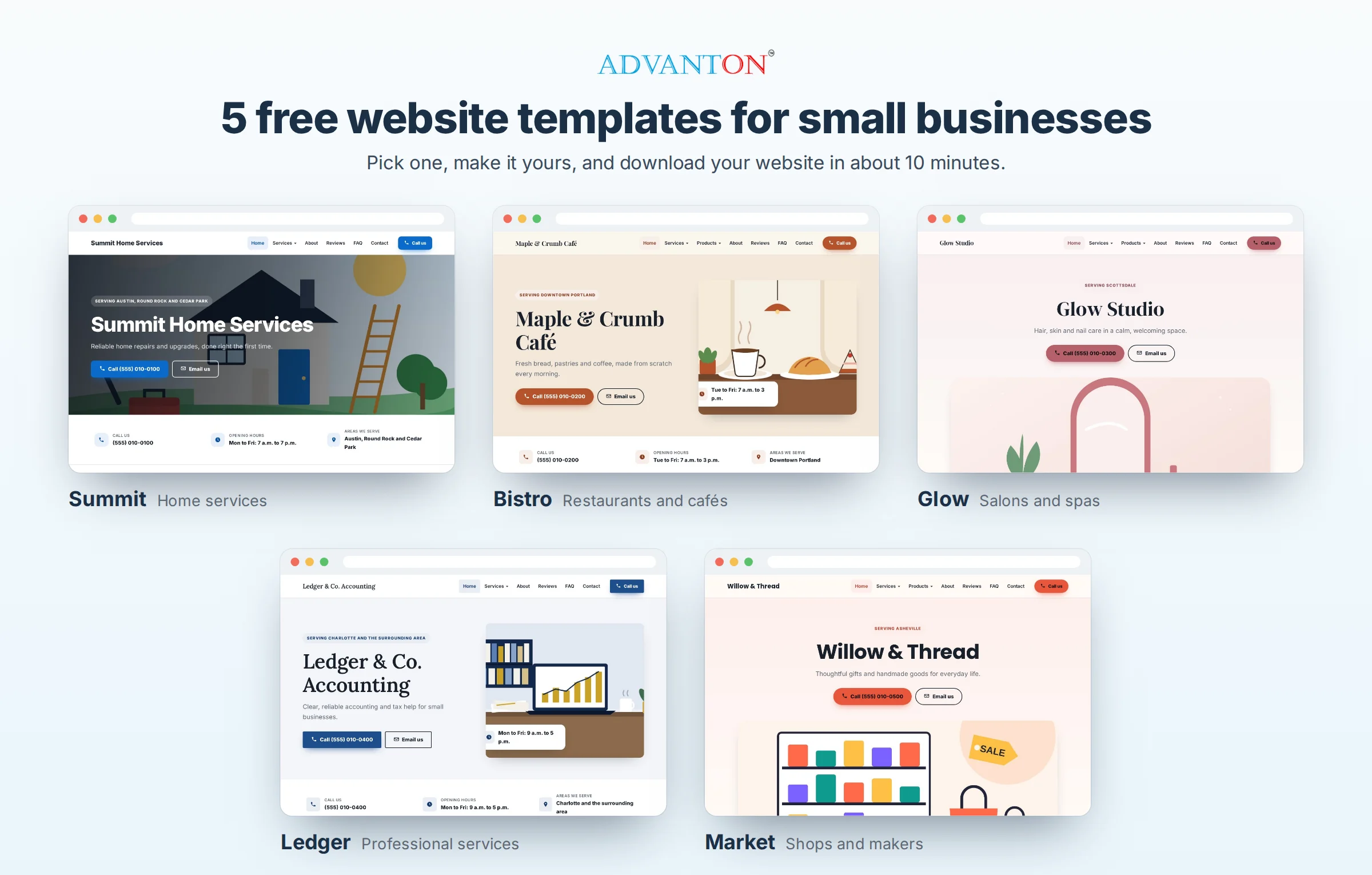
- Summit, for home services and trades: bold and trustworthy.
- Bistro, for restaurants, cafés and bakeries: warm, with elegant serif headings.
- Glow, for salons, spas and wellness: soft, calm and graceful.
- Ledger, for accountants, consultants and other professional services: refined and confident.
- Market, for shops, boutiques and makers: bright and modern, with products front and center.
Each template comes with an original illustration you’re free to keep, and sample services, products, questions and "why choose us" points to edit. You can switch to a different style at any time without losing your content. Templates include sample reviews to show the layout; the builder asks you to replace them with real reviews from your customers, or delete them, before you download.
What you get
- A page for each service (up to 5) and each product (up to 5), with a photo, price, summary, what’s included or key features, more details, and links to your other services or products.
- Overview pages for your services and products, so customers can browse.
- Home, About, Reviews and Contact pages, plus a Gallery page when you add three or more photos and an FAQ page when you add common questions. Up to 18 pages in all, and only the pages you need.
- A polished, modern design that suits any business: eight styles, your brand colors, beautiful typefaces, drop-down menus and a call bar on phones.
- Search-friendly from the start: every page has its own title and description, products and services carry the details search engines read, and you get a sitemap of every page once you add your web address.
- Fast and safe: simple pages with nothing to update or hack, and a friendly "page not found" page.
How to publish your website for free
- Choose Download my website and unzip the file. You’ll get a folder with your website inside.
- Go to Netlify Drop and drag the folder onto the page. Your website is live in seconds.
- Create a free Netlify account to keep it, and connect your own domain (such as yourbusiness.com) whenever you’re ready.
Other free options include Cloudflare Pages (choose "Upload assets"), or you can upload the files to any web host. The download includes step-by-step instructions in a file called HOW-TO-PUBLISH.
Updating your website
Come back to this page in the same browser; your details and photos are saved here. Make your changes, download again, and drag the new folder onto your site’s Deploys page in Netlify. Your website address stays the same.
Tips for a website that wins customers
- Lead with what you do and where, such as "Friendly, reliable plumbing in Austin."
- Write a real description for each service and product: what it is, who it’s for, and what’s included. Pages with useful detail do better in search.
- Use real photos of your work, products, team or premises.
- Only use real reviews, with the customer’s permission.
- Add your website address to your Google Business Profile and social media once it’s live.
Need a domain name? See our domain name generators. Want online booking or a full online store? Our small business website guide compares your options.
Frequently asked questions
Is it really free?
Yes. The builder and all five templates are free, and the website you download is yours to keep. Netlify and Cloudflare both offer free hosting for simple websites like this one. The only optional cost is your own domain name, such as yourbusiness.com, which you buy separately.
How long does it take?
About 10 minutes for most businesses: pick a template, replace the sample details with your own, and download. Adding photos and longer descriptions for each service or product takes a little longer, and you can come back any time.
Which pages will my website have?
Home, About, Reviews and Contact, a Services page with a page for each service, and a Products page with a page for each product. Add three or more gallery photos to get a Gallery page, and a few common questions to get an FAQ page. You need at least one service or product.
Can I sell products online with it?
Product pages show your products, prices and details, with buttons to call, email or use your own ordering link. For a full shopping cart and checkout, see our guide to website builders.
Can I use my own domain name?
Yes. Once your site is live on Netlify or Cloudflare, you can connect a domain you own in their settings.
Does it include a contact form?
To keep your website simple and free of spam, it uses tap-to-call, email and WhatsApp buttons instead of a form, which most customers prefer on phones.
Last reviewed October 22, 2026.