
Opening a business bank account is one of the first practical steps in starting a business, and one of the most important. It keeps your books clean, makes taxes far easier, looks professional when customers pay you, and, if you’ve formed an LLC or corporation, helps protect your personal liability shield. Mixing personal and business money is one of the most common reasons courts disregard an LLC’s protection.
This guide covers the documents you’ll need for each type of business, how to compare banks and fees (with a worked example), the FDIC coverage rules many owners misunderstand, the risks of fintech apps, and money habits that make running your business easier.
Why a separate account matters
Table of Contents
- Liability protection: an LLC or corporation that keeps its own money separate is much harder for creditors to “pierce”.
- Simpler bookkeeping: every business transaction in one place, ready for your accounting software.
- Easier taxes: clear records of income and deductible expenses if the IRS ever asks.
- Professionalism: customers pay “Sunrise Cleaning LLC”, not your personal name.
- Access to business services: card processing, business credit cards, loans and payroll.
What you’ll need, by business type
| Business type | What banks usually ask for |
|---|---|
| Sole proprietor (own name) | Photo ID and your Social Security number or EIN |
| Sole proprietor (business name) | Photo ID, SSN or EIN, and your DBA certificate; see how to register a DBA |
| Single-member LLC | EIN, articles of organization, operating agreement (often), photo ID |
| Multi-member LLC | EIN, articles of organization, operating agreement, ID for owners and signers |
| Corporation | EIN, articles of incorporation, bylaws, a board resolution authorizing the account, ID for officers and signers |
| Partnership | EIN, partnership agreement, ID for partners |
Ownership information: under federal customer due diligence rules, banks must identify everyone who owns 25% or more of a company, plus one person with significant control (such as a CEO or managing member), and verify their identities. Have names, addresses, dates of birth and ID ready for each.
Most banks also ask about your expected activity: monthly deposits, cash handling, international payments and the nature of your business. Answer accurately, because unusual activity that doesn’t match can trigger account reviews or closures.
Don’t have an EIN yet? Get one free from the IRS in minutes; see how to get an EIN.
Types of business accounts
| Account | What it’s for |
|---|---|
| Business checking | Everyday income and expenses; the account to open first |
| Business savings or money market | Tax set-asides and an emergency cushion, earning interest |
| Merchant services | Accepting card payments, often bundled or offered by partners |
| Business credit card | Purchases, rewards and building business credit |
| Line of credit | Borrowing for short-term cash gaps, once you have some history |
Where to bank: your options
| Option | Strengths | Watch for |
|---|---|---|
| Large national banks | Branches and ATMs everywhere, full range of services, cash deposits | Monthly fees unless you meet balance or activity requirements |
| Community banks | Personal service, local lending decisions, often SBA lenders | Fewer branches; check app quality |
| Credit unions | Lower fees, member-focused service | Membership requirements; fewer business features at some |
| Online banks | Low or no fees, strong apps | Cash deposits can be hard or costly |
| Fintech apps | Easy setup, great software, integrations | Your money is held at a partner bank; understand how it’s protected (see below) |
Compare specific accounts in our guide to the best banks for small business.
How to compare accounts
- Monthly fee and exactly how to waive it (minimum balance, deposits, or activity).
- Included transactions each month, and fees beyond them.
- Cash deposits: monthly limits and fees, and where you can deposit.
- ACH and wire fees, incoming and outgoing.
- Mobile check deposit limits.
- User access: permissions for employees or your bookkeeper.
- Integrations with your accounting, payroll and payment software.
- Interest on balances, if any.
- Fraud tools such as account alerts and positive pay (which checks outgoing checks against a list you provide).
A worked example: which account costs less?
These are illustrative assumptions, not real bank prices. Plug in the actual fees of the accounts you’re comparing.
A small café makes about 150 card and bank transactions a month and deposits $4,000 in cash each month, usually keeping around $3,000 in the account.
| Account A: branch bank | Account B: online bank | |
|---|---|---|
| Monthly fee | $15, waived with a $5,000 average balance (not met) | $0 |
| Transactions | 200 included | Unlimited |
| Cash deposits | Free up to $5,000 a month at the branch | Only at retail partners, $4.95 per deposit; 8 deposits a month |
| Estimated monthly cost | $15 | About $40 |
For a business that rarely handles cash, Account B would cost nothing. For this café, cash handling decides the winner. Always compare accounts against your own activity, not the headline fee.
FDIC coverage: what most owners don’t realize
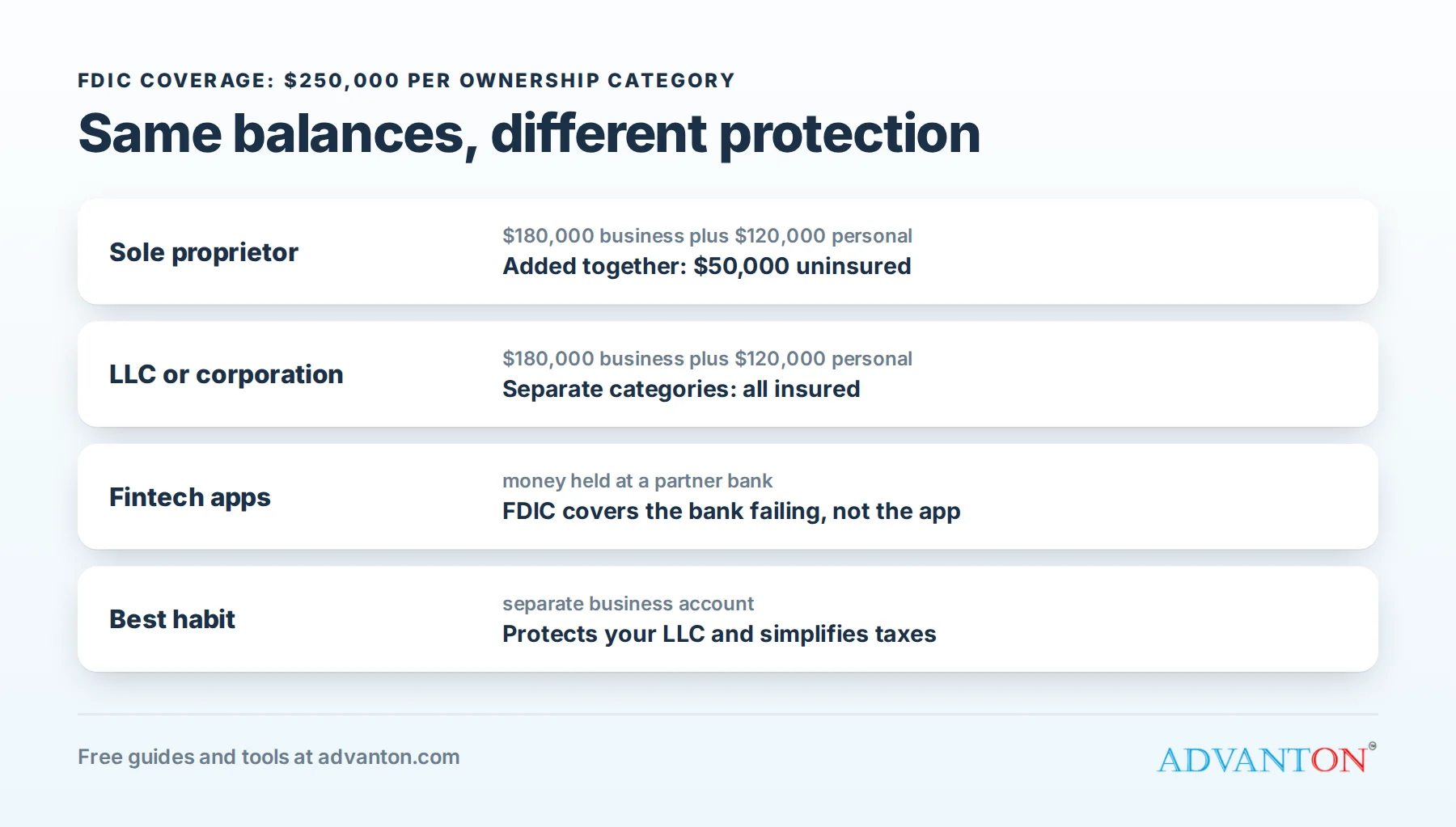
The FDIC insures deposits up to $250,000 per depositor, per insured bank, for each account ownership category. Credit unions have equivalent coverage through the NCUA. But how your business is set up changes how coverage works:
- LLCs and corporations: accounts owned by the business are insured in their own category, separately from the owners’ personal accounts at the same bank.
- Sole proprietorships: a sole proprietorship isn’t a separate legal entity, so its business accounts are treated as the owner’s single accounts and are added together with the owner’s personal accounts at that bank for the $250,000 limit.
Example: a sole proprietor with $180,000 in a business account and $120,000 in a personal savings account at the same bank has $300,000 in the same ownership category, so $50,000 isn’t insured. An LLC with the same balances would have both fully covered, in separate categories.
If balances grow past the limits, options include spreading money across banks, using services that place deposits across multiple banks, or holding Treasury bills through a brokerage.
Fintech apps: know where your money is
Many business apps aren’t banks. They partner with FDIC-insured banks that actually hold your money, and FDIC insurance protects you if the bank fails, not if the app company does. In 2024, the collapse of Synapse, a company that connected fintech apps to partner banks, left many app customers unable to reach their money for months.
Before you choose an app, check:
- Which bank holds your deposits, and that it’s FDIC-insured.
- Whether your funds are held in your name (or in an account with clear records showing they’re yours) so pass-through insurance applies.
- How quickly you could move your money if something went wrong.
Keeping a second account at a traditional bank is a sensible backup.
Opening the account, step by step
- Gather your documents for your business type.
- Compare two or three accounts against your real activity.
- Apply online or at a branch. Many banks open accounts online in a day; some require a visit for LLCs and corporations.
- Make your opening deposit, if required.
- Set up online banking, alerts, and user access for anyone who needs it.
- Order checks or a debit card, and connect your accounting and payment software.
Good money habits from day one
- Run every business dollar through the business account, in and out.
- Pay yourself by transfer (an owner’s draw or salary), never by paying personal bills from the business account.
- Set aside taxes with every payment you receive, often 25% to 30% of profit, in a separate savings account. Our small business taxes guide explains estimated taxes.
- Keep a cash cushion of a few months’ expenses.
- Reconcile monthly against your accounting software.
- Turn on alerts for large transactions and low balances.
When one account isn’t enough
Many owners find it easier to manage money with a few accounts, each with a job:
| Account | Its job |
|---|---|
| Operating checking | All income comes in here; everyday bills go out |
| Tax savings | A set percentage of every payment moves here, ready for estimated and annual taxes |
| Payroll checking | Wages and payroll taxes only, so payroll never collides with other bills |
| Emergency or profit savings | A cushion for slow months, and profit you’ve deliberately kept |
Moving money on a schedule (for example, every Friday) turns these accounts into a simple budget you can see at a glance.
Business credit card or debit card?
- Business credit cards offer fraud protection, rewards, time before payment is due and a way to build business credit. Pay the balance in full each month to avoid interest, and remember that most small business cards require a personal guarantee.
- Debit cards spend money you already have, which keeps spending in check, but fraud on a debit card can drain your account until it’s resolved.
Many owners use a credit card for purchases and subscriptions, and the debit card mainly for cash withdrawals.
Switching banks without disruption
- Open the new account first and keep the old one open for a month or two.
- Move payment details: update customers, payment processors, marketplaces and your invoices.
- Move automatic payments: software subscriptions, loans, rent and payroll.
- Watch both accounts until nothing new arrives in the old one.
- Close the old account in writing, and download statements you’ll need for your records.
Common mistakes to avoid
- Using your personal account “just for now”, then untangling months of mixed transactions at tax time.
- Choosing on headline fees alone without checking cash and transaction costs.
- Forgetting the FDIC rules for sole proprietors with large balances.
- Keeping all your money in one fintech app with no backup account.
- Letting someone else open the account in their name for your business.
Frequently asked questions
Can I open a business bank account online?
Yes. Many banks and credit unions open business accounts entirely online, though some ask LLCs and corporations to visit a branch or upload extra documents.
Do I need an EIN to open a business account?
LLCs with more than one member and corporations need one. Many banks also ask single-member LLCs for an EIN. Some let sole proprietors use their Social Security number.
Can I use a personal account for my business?
It’s legal for a sole proprietor, but it makes bookkeeping and taxes harder. For an LLC or corporation, it can weaken your liability protection. A separate account is strongly recommended.
How much money do I need to open an account?
It depends on the bank: some require nothing, others a small opening deposit. Balance requirements usually apply to waiving monthly fees.
Should I choose a bank that makes SBA loans?
If you expect to borrow in the next year or two, it helps. Banks usually lend first to customers whose accounts they can see, and a record of steady deposits and clean statements makes approval easier. Many community banks and credit unions are active SBA lenders, so ask about their lending when you open your account, even if you don’t need a loan yet.
Keep learning
Sources
- FDIC, Your insured deposits
- FinCEN, Customer due diligence requirements for financial institutions
- US Small Business Administration, Open a business bank account
- FDIC, Banking with third-party apps
Last reviewed October 26, 2026. Startup costs are estimates; check local prices, licensing and tax rules before you commit money.


Leave a Reply