• Skip to primary navigation
  • Skip to main content
  • Skip to footer
advanton usa logo

Advanton USA

  • Start
    • How to start a business, A to Z
    • Business ideas
    • Test your business ideaTest your idea with real industry data
    • Choosing a business structure
    • Get an EIN
    • SBA loans
    • Small business grants
    • Business banking
    • Franchises
  • Grow
    • Hiring your first employee
    • Taxes and bookkeeping
    • Keeping customers
    • Financing growth
    • Using AI
    • Industry data
    • Services owners use
      • USPS for small business
      • Every Door Direct Mail
      • USPS vs UPS vs FedEx
      • Yelp for Business
      • Apple Maps listing
  • Free Tools
    • Start
      • Business Idea Reality CheckTest your idea with real industry data
      • Business PlannerName, costs, pricing and a one-page plan
    • Launch
      • Launch your business onlineDomain, website and hosting, step by step
      • Brand & Print StudioCards, flyers, postcards, signs and more
      • Website builderA free website in about 10 minutes
    • Market
      • Marketing HubOnline presence, reviews and lead tracking
      • Local SEO checkerScan your site and fix local rankings
    • Grow
      • Quotes and invoicesProfessional quotes and invoices
      • Cash & Payroll PlannerCash flow, hiring costs and unpaid invoices
      • Mileage logBusiness miles at the 2026 IRS rate
      • Rewards programStamp cards that bring customers back
      • Word to PDFConvert Word documents to PDF
  • Contractors
    • Contractor website builderWebsites for 8 trades, 5 designs each
    • Websites by trade
      • Roofing
      • Remodeling
      • Painting
      • Plumbing
      • Flooring and tile
      • Electrical
      • HVAC
      • Handyman
    • Yard signs and door hangersYard signs and door hangers with a QR code
    • Marketing for contractors
    • Angi vs Thumbtack
  • Local SEO Check
    • Scan your websiteScan your site and fix local rankings
    • Plan service and town pagesScan your site and fix local rankings
    • Generate LocalBusiness schemaScan your site and fix local rankings
    • Business Profile checklistScan your site and fix local rankings
    • Compare with competitorsScan your site and fix local rankings
    • Learn the ranking factorsScan your site and fix local rankings
  • Directory
    • Browse the directoryFind local small businesses
    • Add your businessA free listing in the directory
  • Get Online
    • Launch your business onlineDomain, website and hosting, step by step
    • Free website builderA free website in about 10 minutes
    • Contractor website builderWebsites for 8 trades, 5 designs each
    • Domains and hosting
    • After you buy: help guides
      • Verify your new domain
      • Upload your website
      • Connect your domain
      • Turn on free SSL
      • Set up business email
      • Renewals
Home » 22 SEO Basics for Small Business Websites (2026 Guide)

22 SEO Basics for Small Business Websites (2026 Guide)

October 25, 2018 Leave a Comment

Updated October 2026

Search engine optimization (SEO) means helping search engines understand what your business does and where, so they can show it to the right people. For a small business, you don’t need tricks. You need a clear, useful website, a complete Google Business Profile and patience. These 22 basics cover what matters in 2026, in plain language. For more depth, see our guide to search engine optimization and Google ranking and Google’s own SEO Starter Guide.
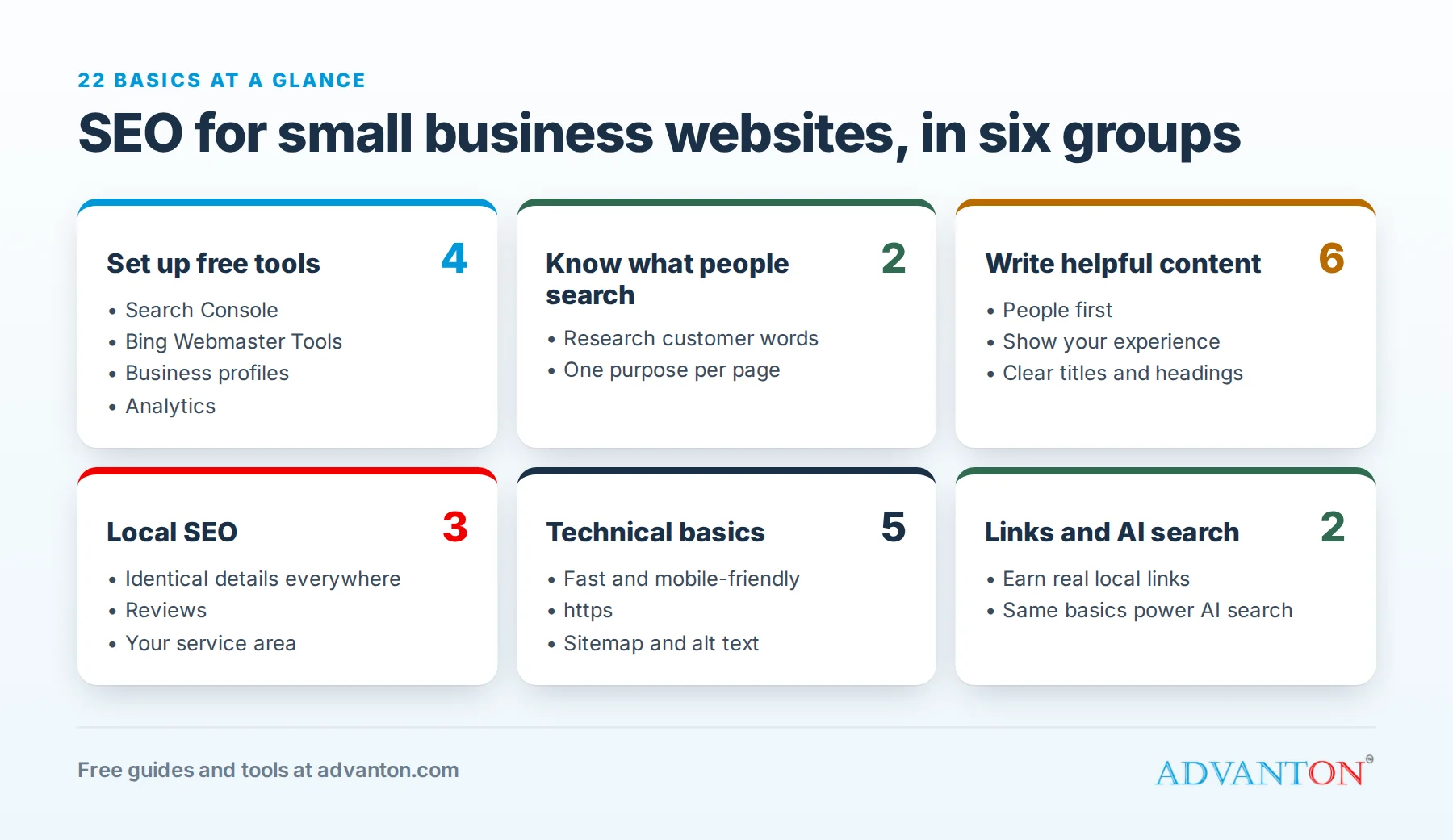
22 SEO basics in six groups: setting up free tools, keyword research, helpful content, local SEO, technical basics, and links and AI search

Set up the free tools

Table of Contents

  • Set up the free tools
  • Know what people search for
  • Write helpful content
  • Local SEO
  • Technical basics
  • Links and reputation
  • Search is changing, the basics aren’t
  • Be patient, and choose help carefully
  • Keep learning
  • Sources
  1. Google Search Console. Free. It shows which searches bring people to your site, which pages Google has found, and any problems. Set it up at Google Search Console.
  2. Bing Webmaster Tools. The same for Bing, which also feeds other search and AI services. Set it up at Bing Webmaster Tools.
  3. Google Business Profile and Bing Places. Essential for local businesses. See how to create a Google Business Profile listing.
  4. Website analytics, such as Google Analytics, to see how visitors use your site.

Know what people search for

  1. Research the words customers use. Start with Search Console’s search reports, Google’s autocomplete suggestions and the questions customers ask you. Paid tools such as Semrush and Ahrefs offer limited free features too.
  2. Match each page to a purpose. Give each main service its own page, focused on how customers describe it ("drain cleaning in Mesa" rather than "hydro-jetting solutions").

Write helpful content

  1. Write for people first. Google rewards helpful, reliable, people-first content: content that answers the question fully, written by someone who knows the subject.
  2. Show your experience. Real photos, examples of your work, credentials, and who’s behind the business all build trust.
  3. Use clear page titles and headings. Each page title should say what the page is about and, for local services, where.
  4. Write a useful meta description. It doesn’t directly affect rankings, but it’s often the summary people see in search results, so make it worth clicking.
  5. Write your own product and service descriptions rather than copying manufacturers’ text.
  6. Update important pages when your services, prices or hours change.

Local SEO

  1. Keep your name, address and phone identical everywhere online.
  2. Earn reviews on your Google Business Profile, and reply to them.
  3. Mention your service area naturally on your website.

Technical basics

  1. Make your site fast and mobile-friendly. Most local searches happen on phones.
  2. Use https (the padlock in the browser).
  3. Use simple, readable web addresses, such as yourbusiness.com/roof-repair.
  4. Link between your own pages with descriptive text, so visitors and search engines can find related information.
  5. Submit a sitemap in Search Console so Google can find all your pages, and describe images with alt text.

Links and reputation

  1. Earn links from real local organizations, such as suppliers, partners, your chamber of commerce, local media and community groups. Avoid buying links or using link schemes; they break Google’s spam policies and can harm your rankings. Press releases (through services like PRLog) can help with publicity when you have real news, but they aren’t a way to build links. For listing ideas, see how to promote your website for free.

Search is changing, the basics aren’t

  1. Prepare for AI search the same way. AI features in search, and AI assistants, draw on the same signals as regular search: clear, accurate, helpful pages, consistent business information and good reviews. Google says there’s nothing special you need to do beyond SEO best practices. Answer real questions clearly, and keep your business details correct everywhere.

Be patient, and choose help carefully

SEO usually takes months, not weeks. If you hire help, be wary of anyone who guarantees rankings or won’t explain what they’ll do. Ask for examples, monthly reports, and confirmation that you’ll own everything they create. Social media activity isn’t a direct ranking factor, but it helps people discover you, so treat it as a separate channel.

Share this guide

Keep learning

  • Building your online presence
  • Small business website guide
  • Local online marketing
  • Best advertising ideas for small businesses
  • Free marketing tools for home businesses
  • Google Classroom and online learning platforms
  • Free online presence checkup
  • Industry data and business ideas
  • Start a Business A–Z guide

Sources

  1. Google Search Central, SEO Starter Guide
  2. Google Search Central, Creating helpful, reliable, people-first content
  3. Google Search Central, Spam policies
  4. Google Search Central, AI features and your website

Last reviewed October 22, 2026. Startup costs are estimates; check local prices, licensing and tax rules before you commit money.

Starting or growing a small business? Explore industry data and business ideas by budget, or follow the step-by-step guide to starting a business.

Filed Under: Small Business Marketing

Reader Interactions

Leave a Reply Cancel reply

Your email address will not be published. Required fields are marked *

Local SEO Check Free: scan your website and see what to fix to rank in local search →

Start and grow

  • Start a business, A to Z
  • Industry data
  • Services owners use
  • Grow your business

Free tools

  • Website builder
  • Local SEO Check
  • Business Planner
  • Quotes and invoices
  • Rewards program
  • Brand & Print Studio
  • All free tools

Get online

  • Launch your business online
  • Domains and hosting
  • Verify your new domain
  • Upload your website
  • Set up business email
  • For contractors

Advanton

  • About
  • Contact
  • Business directory
  • Add your business
  • Back up your work
  • Privacy policy

Advanton Free guides and tools for US small businesses.

Advanton earns money when you buy a domain or hosting through our store. It helps keep our guides and tools free.

Footer

About ADVANTON

Free guides and tools that help small businesses start, launch online, find customers and grow.

Follow us

  • facebook
  • twitter
  • yelp

Our Associations

Contact Us

Email: info[at]advanton.com

From rest of the world, email us: info[at]advanton.com

Copyright © 2026 — ADVANTON • All rights reserved. • Privacy Policy

  • Start
  • Grow
  • Free Tools
  • Contractors
  • Local SEO Check
  • Directory
  • Get Online