
Most small businesses lose sales not because customers say no, but because nobody followed up. A quote goes out, life gets busy, and the lead quietly goes cold. A CRM (customer relationship management system) fixes that: it keeps every lead, customer, conversation, quote and follow-up in one place, and reminds you what to do next.
If your customer list lives in a spreadsheet, your inbox or your head, a free CRM is often the single most valuable upgrade you can make. This guide reviews the best free CRM software in 2026, explains what each free plan includes and where the catches are, and shows you how to set one up in an afternoon.
Do you need a CRM?
Table of Contents
You probably do if any of these sound familiar:
- You lose track of follow-ups or forget which quotes are still open.
- More than one person talks to customers, and nobody knows who said what.
- Your sales take several steps: inquiry, call, quote, follow-up, booking.
- You don’t know which marketing brings customers.
- Repeat customers matter, and you want to remind them when it’s time to buy again.
CRM concepts in plain language
- Contacts: the people you deal with: leads, customers, suppliers.
- Companies: the businesses those people work for, useful if you sell to other businesses.
- Deals (or opportunities): a potential sale, with a value and a stage, such as "Kitchen remodel, $18,000, quote sent".
- Pipeline: the stages a deal moves through, shown as columns you drag deals between.
- Tasks and reminders: the next action for each contact or deal, with a due date.
- Activity history: emails, calls, notes and meetings logged against each contact, so anyone on your team can pick up where someone else left off.
Quick picks
| If you want | Choose |
|---|---|
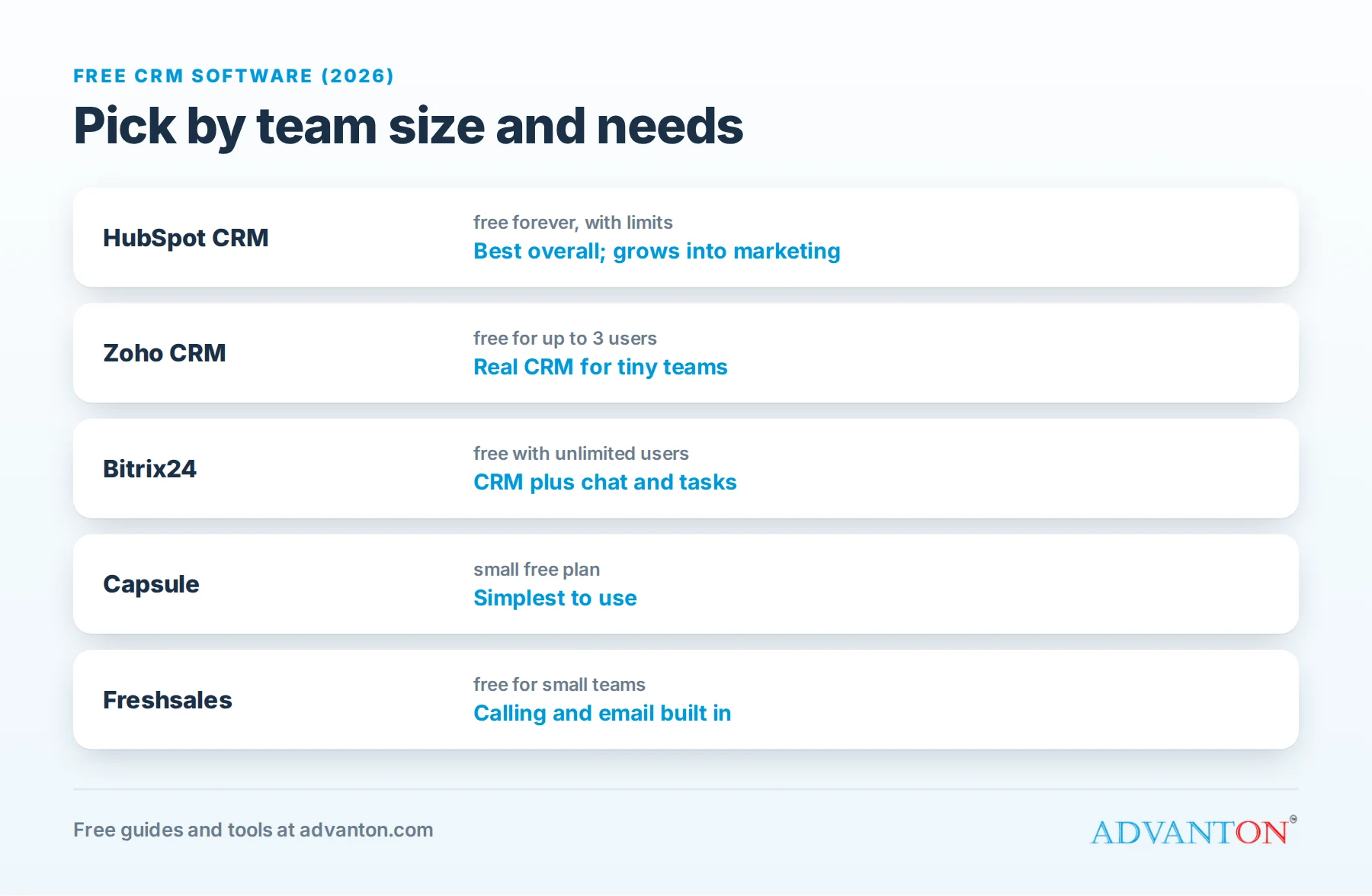
| A polished free CRM with room to grow into marketing tools | HubSpot CRM |
| Real CRM features for a team of up to three, free | Zoho CRM |
| CRM plus tasks, chat and collaboration for a larger team | Bitrix24 |
| Simple, uncluttered contact and pipeline tracking | Capsule |
| Calling and email built in for a small sales team | Freshsales |
How we evaluated
We compared each CRM’s free plan limits (users, contacts and features), ease of setup, pipeline and reminder features, email and calendar connections, mobile apps, and the cost and path to upgrade.
The best free CRMs, reviewed
HubSpot CRM: best overall free CRM
What’s free: HubSpot’s free CRM includes contact and company records, deal pipelines, tasks, email tracking and templates, meeting scheduling links, live chat and simple forms, all on a free-forever plan.
Best for: small businesses that want an easy, polished CRM today and may later add marketing, sales or service tools.
Catches: free plans include limits on users, contacts and some features, and HubSpot branding appears in places. Paid upgrades can get expensive as you add seats and features, so check costs before you build your whole process around premium features.
Zoho CRM: best free plan for small teams
What’s free: Zoho CRM’s free edition supports up to three users, with leads, contacts, deals, tasks and basic workflows.
Best for: very small teams who want a "real" sales CRM, and businesses already using Zoho Books, Zoho Mail or other Zoho apps.
Catches: the free edition limits automation, storage and some modules. The interface has more options than HubSpot’s, so setup takes a little longer.
Bitrix24: most generous on users
What’s free: Bitrix24’s free plan allows unlimited users, and combines a CRM with tasks, team chat, calendars and file sharing.
Best for: teams that want CRM and collaboration in one free tool.
Catches: the free plan limits storage and advanced features, and the all-in-one interface can feel busy if you only want a CRM.
Capsule: simplest to use
What’s free: Capsule offers a free plan for a small number of users and contacts, with contact management, tasks and a sales pipeline.
Best for: owners who want a clean, simple CRM without a learning curve.
Catches: contact limits on the free plan are low, so it’s best for small client lists.
Freshsales: built for calling and email
What’s free: Freshsales (from Freshworks) has offered a free plan for small teams with contact management, email and built-in phone features.
Best for: small sales teams that make lots of calls.
Catches: free plan features and user limits change, so confirm what’s included before committing.
Comparison at a glance
| HubSpot | Zoho CRM | Bitrix24 | Capsule | Freshsales | |
|---|---|---|---|---|---|
| Free users | Limited | Up to 3 | Unlimited | Small team | Small team |
| Deal pipeline | Yes | Yes | Yes | Yes | Yes |
| Email tracking and templates | Yes | Basic | Basic | Limited | Yes |
| Collaboration tools | Basic | Basic | Extensive | No | Basic |
| Ease of setup | High | Medium | Medium | High | Medium |
| Best upgrade path | Marketing and sales suites | Zoho apps | All-in-one workspace | Simple paid tiers | Sales and calling |
Free plans change often, so check each provider’s current terms.
Which should you choose?
- A solo owner or freelancer: HubSpot or Capsule for simplicity.
- A team of two or three salespeople: Zoho CRM’s free edition, or HubSpot if the limits fit.
- A team of five to twenty that also needs chat and tasks: Bitrix24.
- A phone-heavy sales team: Freshsales.
- You already use Zoho or Google tools: pick the CRM that connects most easily with them.
A simple sales pipeline to copy
Most small businesses only need five stages:
| Stage | What it means | Your next step |
|---|---|---|
| New inquiry | A lead got in touch | Reply within an hour during business hours |
| Qualified | They need what you offer and can buy | Book a call or visit |
| Quote sent | You’ve sent a price | Follow up in 2 to 3 days |
| Won | They said yes | Deliver, invoice, then ask for a review |
| Lost | They said no or went quiet | Record why, and check back in a few months |
Our free quote and invoice generator creates professional quotes, and our review request kit helps you ask happy customers for reviews when a deal closes.
A worked example: cost per customer by lead source
These are illustrative numbers. The point is the method: once your CRM records where each lead came from, you can see which marketing actually pays.
| Lead source | Monthly cost | Leads | Customers won | Cost per customer |
|---|---|---|---|---|
| Google Ads | $600 | 30 | 6 | $100 |
| Lead marketplace | $450 | 15 | 3 | $150 |
| Referrals (thank-you gifts) | $100 | 8 | 5 | $20 |
| Google Business Profile (free) | $0 | 12 | 5 | $0 |
In this example, referrals and the Google Business Profile bring customers far more cheaply than paid leads, so the owner would invest more time there, such as asking every happy customer for referrals and reviews.
Follow-up timing that wins deals
| When | What to do |
|---|---|
| Within an hour of an inquiry (business hours) | Reply personally, and book a call or visit |
| Same day or next day | Send your quote |
| 2 to 3 days after the quote | Check whether they have questions |
| One week after | Offer a quick call, or a simpler option if price is the concern |
| One month after | A friendly last check-in, then mark the deal Won or Lost |
Many sales are won simply by following up when competitors don’t.
CRM setups for different businesses
- Contractors and home services: a pipeline of Inquiry, Site visit, Estimate sent, Booked and Completed, with job addresses and photos. Pair it with a website estimate form; our free contractor website builder includes one.
- Salons, spas and wellness: focus on rebooking, with reminders when a client is due for their next visit.
- Consultants and B2B services: track companies, decision-makers and deal values, with a longer pipeline.
- Retail and e-commerce: use the CRM mainly for customer lists, purchase history and email marketing.
Privacy and email rules
Store only the information you need, protect it with strong passwords and two-factor login, and remove people who ask you to. If you email marketing messages from your CRM, follow the FTC’s CAN-SPAM rules: honest subject lines, your physical address and an easy way to unsubscribe. See our guide to free email marketing software.
Set up a CRM in an afternoon
- Import your contacts from your email, phone and spreadsheets.
- Create the five-stage pipeline above.
- Add a "lead source" field (Google, referral, website, social media) and fill it in for every new lead.
- Connect your email and calendar, so conversations and meetings are logged automatically.
- Create templates for your most common replies.
- Set a reminder rule: every open quote gets a follow-up task.
- Review your pipeline every Monday for 15 minutes.
Questions to ask before you commit
- How many people will use it in the next year, and does the free plan allow that many?
- How many contacts do you have now, and how many will you have in a year?
- Does it connect with your email and calendar (Gmail, Outlook), and your accounting software?
- Is the mobile app good? Many owners update deals from a phone between jobs.
- Can you export everything (contacts, deals and notes) if you switch later?
- What will the first paid plan cost for your team size, if you outgrow the free one?
A 10-minute daily CRM routine
- Open today’s tasks first thing, and work through follow-ups before anything else.
- Add every new inquiry with its source, and reply within the hour where you can.
- Move deals forward: drag each deal to its new stage after every call, visit or quote.
- Log quick notes after conversations: what they need, their budget, their timeline.
- Set the next task on every open deal, so nothing sits without a next step.
Ten minutes a day keeps the pipeline accurate, and an accurate pipeline tells you whether next month will be busy or quiet while there’s still time to act.
Common CRM mistakes
- Importing everything and organizing nothing. Start with active customers and leads.
- Too many stages and fields. Complexity kills adoption.
- Not logging lead sources, so you can’t tell which marketing works.
- Only one person using it. A CRM works when everyone who talks to customers uses it.
- Never following up. The pipeline is only useful if you act on it.
When to upgrade
Consider a paid plan when you need more users or contacts than the free plan allows, automation (such as automatic follow-up emails), advanced reports, or integrations with your accounting, phone or marketing tools that the free plan doesn’t include.
Frequently asked questions
Is a free CRM good enough for a small business?
For many small businesses, yes. A free CRM covers contacts, pipelines and reminders, which is most of the value. Upgrade when limits or missing automation start costing you time or sales.
Can I use a spreadsheet instead of a CRM?
At the very start, yes. But spreadsheets don’t remind you to follow up, log emails or show your pipeline at a glance, and they get messy as soon as two people use them.
How long does it take to set up a CRM?
A basic setup takes an afternoon. The real work is building the habit of logging every lead and follow-up.
Is my customer data safe in a free CRM?
Reputable CRMs use encryption and security controls. Turn on two-factor login, limit who can export data, and respect privacy laws when you store and email contacts.
What’s the difference between a CRM and email marketing software?
A CRM manages relationships one to one: leads, deals, conversations and follow-ups. Email marketing software sends one message to many people, such as a newsletter. Some CRMs include basic email marketing, and many connect to dedicated email tools.
Should I pay for a CRM from the start?
Usually not. Start with a free plan, build the habit of logging leads and follow-ups, and upgrade when a specific limit or missing feature is costing you time or sales.
Can I connect my website’s contact form to a CRM?
Yes. Most CRMs offer free forms you can embed on your website, or connect to existing forms, so every inquiry lands in your pipeline automatically with its source already filled in.
Keep learning
- How to generate inbound sales leads
- How to keep customers coming back
- Best free scheduling apps
- Best small business software
Sources
Last reviewed October 26, 2026. Startup costs are estimates; check local prices, licensing and tax rules before you commit money.


Leave a Reply