
A point of sale (POS) system is where you ring up sales, take payments, print or email receipts, and, with the better ones, track stock, customers and staff. Several POS systems now offer free software plans, which is a real help for new shops, cafes, salons and market sellers.
But "free" in point of sale almost always means the software is free and the payment processing isn’t. The company makes its money from a small percentage of every card payment. So the real question isn’t "which POS is free?" but "which one costs least for the way I sell?" This guide answers that, with the fees spelled out and worked examples.
How free POS systems make money
Table of Contents
- Card processing fees on every card payment, usually a percentage plus a few cents.
- Paid plans with more features, such as advanced inventory, staff tools or multiple locations.
- Hardware: card readers, registers, receipt printers and cash drawers.
- Add-ons, such as kitchen display screens, loyalty programs or online ordering.
Quick picks
| Tool | Best for | Free plan in brief |
|---|---|---|
| Square (Free plan) | Most small shops, services and food businesses | No monthly fee; 2.6% + 15¢ per in-person card payment |
| Loyverse | Budget shops and cafes that want to choose their own card processor | Free core apps; no transaction fee from Loyverse |
| Toast (Starter Kit) | Small restaurants | $0 a month for up to two terminals |
| Shopify POS Lite | Online stores that also sell in person | Included with any Shopify plan (not free on its own) |
How we evaluated
We compared monthly software cost, card processing fees, hardware costs, ease of setup, inventory and customer features on the free plan, and how much it costs to grow. Fees are from current 2026 sources; card rates change, so confirm on each provider’s pricing page.
The best free POS systems, reviewed
1. Square Free: best overall
Cost: $0 a month. In-person card payments: 2.6% + 15¢. Online payments: 3.3% + 30¢.
Square’s free plan is a complete point of sale, not a demo: a register app that runs on a phone or tablet, item library and basic inventory, digital receipts, customer records, invoicing and a simple online store. There’s no monthly fee and no long contract, and you can start with an inexpensive card reader.
The catch: the flat rate is simple, but it adds up as sales grow, and the 15¢ fixed fee hurts on small sales. Paid plans lower the in-person rate slightly and add features.
Choose it if: you want to start selling quickly with no monthly cost.
2. Loyverse: best for choosing your own card processor
Cost: core apps (POS, dashboard, kitchen display, customer display) are free, with no transaction fee from Loyverse itself.
Loyverse works with separate card processors, so you can shop around for card rates. It includes sales reports, basic inventory and a simple loyalty program. Paid add-ons cover advanced inventory and employee management.
The catch: you’ll set up a card processor separately, and the most useful inventory and staff tools are paid add-ons.
Choose it if: you’re comfortable with a little more setup to control processing costs.
3. Toast Starter Kit: best for small restaurants
Cost: $0 a month on the Starter Kit, designed for restaurants with up to two terminals.
Toast is built for restaurants: table and menu management, kitchen tickets, modifiers and online ordering options. The Starter Kit lets small restaurants start without a monthly software fee.
The catch: processing on the free plan costs more than on Toast’s paid plans, and Toast generally requires its own payment processing. Read the contract terms carefully.
Choose it if: you run a small restaurant or cafe that needs restaurant-specific features.
4. Shopify POS Lite: best if you already sell on Shopify
Cost: included with any Shopify store plan, so it isn’t free on its own.
If your business runs an online store on Shopify, POS Lite lets you sell in person at markets, pop-ups or a small shop, with inventory and customers shared between online and in-person sales.
The catch: you need a paid Shopify plan, and the more advanced POS Pro costs extra per location.
Choose it if: your main business is a Shopify store.
Worked example: what card fees really cost
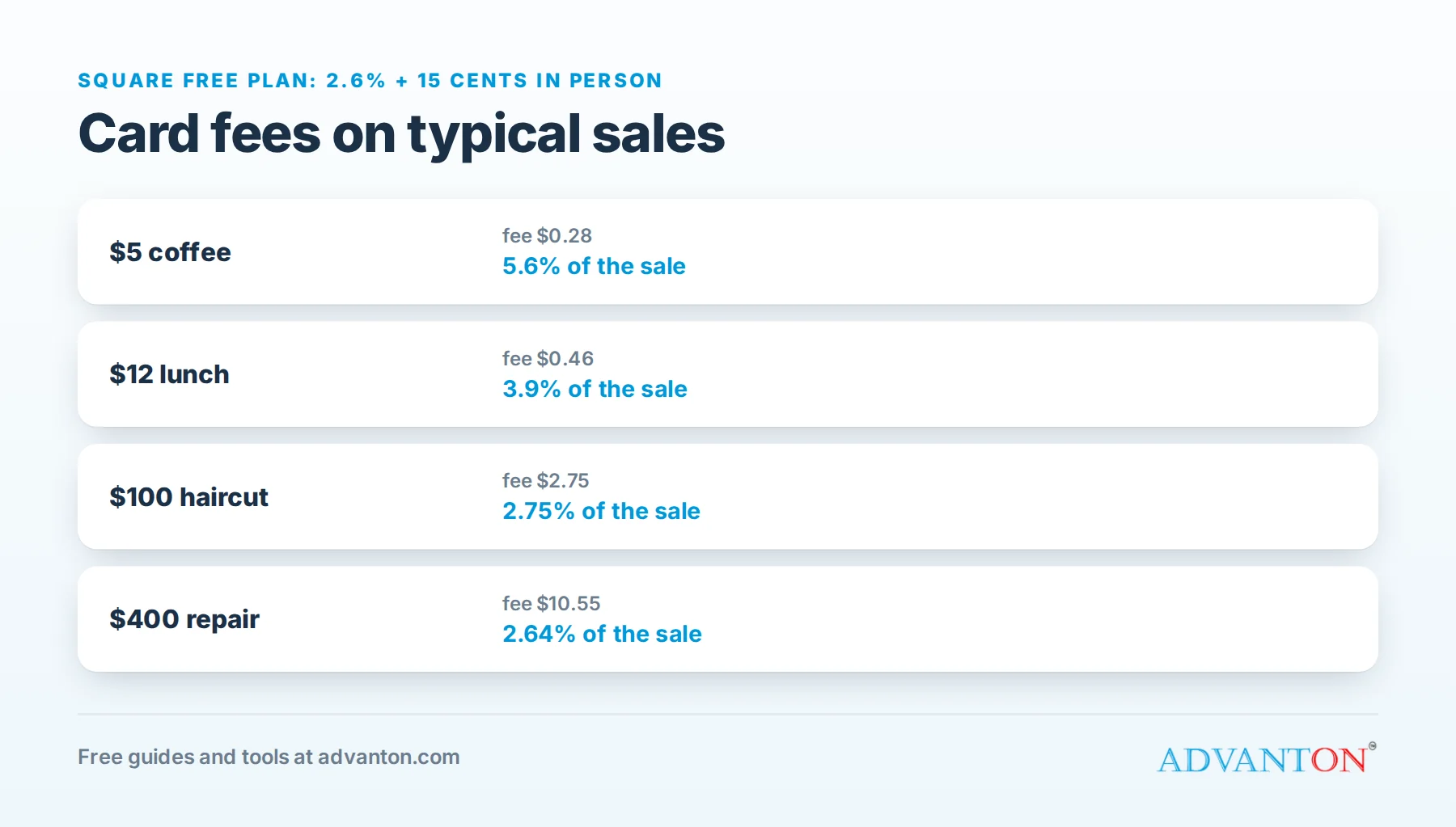
Using Square’s free-plan rate of 2.6% + 15¢ per in-person payment:
| Sale | Fee | Effective rate |
|---|---|---|
| $5 coffee | $0.28 | 5.6% |
| $12 lunch | $0.46 | 3.9% |
| $100 haircut | $2.75 | 2.75% |
| $400 repair | $10.55 | 2.64% |
What this shows: the fixed 15¢ makes small sales relatively expensive. A coffee shop selling thousands of small orders feels card fees much more than a salon. If your average sale is small, compare providers’ rates carefully, and price with fees in mind using our pricing calculator.
Monthly example: a shop taking $20,000 a month in card payments, with an average sale of $25 (800 sales), pays about $20,000 × 2.6% + 800 × $0.15 = $640 a month in processing on Square’s free plan.
How card pricing works
- Flat-rate pricing (used by Square and many free POS systems) charges the same rate on most cards. It’s simple and predictable, but you pay the same whether a customer uses a cheap debit card or an expensive rewards card.
- Interchange-plus pricing passes on the card network’s actual cost for each card, plus a fixed markup. It can be cheaper at higher volumes, but statements are more complicated.
- Online, keyed-in and invoice payments usually cost more than tapping or inserting a card in person, because the fraud risk is higher.
As a rough guide, flat-rate pricing suits most new and small businesses; as card sales grow, ask processors for an interchange-plus quote and compare.
Ways to reduce card fees
- Encourage in-person tap or chip payments rather than keyed-in card numbers.
- Set a sensible minimum for very small card sales where the card network rules and your state allow it.
- Offer bank transfer or ACH for large invoices, which usually costs much less than cards.
- Review your effective rate every few months: total fees divided by total card sales.
- Get competing quotes once you process significant volume. Some states restrict card surcharges, so check the rules before adding any fee for card payments.
Hardware: what you’ll actually need
- A card reader for tap, chip and swipe payments, often the cheapest starting point.
- A phone or tablet to run the POS app.
- Optional: a receipt printer, cash drawer, barcode scanner and a stand for your tablet.
- For restaurants: kitchen printers or kitchen display screens.
Start with the minimum, and add hardware once you know what slows you down.
Features that matter by business type
| Business | Must-have features |
|---|---|
| Retail shop | Barcode scanning, inventory by variant (size, color), returns and exchanges |
| Cafe or quick service | Fast checkout, modifiers (extra shot, oat milk), tipping, kitchen tickets |
| Restaurant | Table management, split checks, coursing, kitchen display |
| Salon or spa | Appointments, staff commissions, client history |
| Market or pop-up seller | Mobile card reader, offline mode, simple product list |
| Service business | Invoices, deposits, card-on-file, payment links |
Tips, gift cards and loyalty
Most POS systems can prompt customers to tip on the card reader screen, which matters for cafes, salons and service businesses. Gift cards and loyalty programs are often paid add-ons; if you want a simple, free loyalty program, our rewards program prints numbered stamp cards you track on your own device, and works alongside any POS.
Selling at markets and events
For pop-ups and markets, look for a POS with a small, battery-powered card reader, an offline mode, a quick product grid, and easy cash tracking. Check your phone’s battery and data plan before a long day, and bring a backup charger.
Comparison at a glance
| Square Free | Loyverse | Toast Starter | Shopify POS Lite | |
|---|---|---|---|---|
| Monthly software | $0 | $0 (paid add-ons) | $0 | Included with Shopify plan |
| Card processing | Square’s rates | Choose your processor | Toast payments | Shopify payments |
| Inventory | Basic | Basic (advanced paid) | Menu and stock basics | Shared with online store |
| Best for | Most small businesses | Budget shops and cafes | Restaurants | Shopify sellers |
Which should you choose?
- Just starting, any industry: Square Free.
- Want control over card rates: Loyverse with a processor you choose.
- Restaurant with table service: Toast’s Starter Kit, or Square for Restaurants.
- Online store first: Shopify POS Lite.
Set up your POS, step by step
- Add your products or services with prices, tax settings and variants.
- Set up your sales tax correctly for your state and city.
- Connect your bank account for payouts, and check how quickly money arrives.
- Set up staff accounts with their own logins and permissions.
- Test a sale and a refund before opening.
- Train everyone on discounts, refunds and end-of-day reports.
- Connect your accounting software, or export sales reports regularly.
Offline mode and reliability
Internet outages happen. Check whether your POS can keep taking card payments offline and process them when the connection returns, and what risks that carries (offline payments that later decline). Keep a backup plan, such as a phone hotspot, for busy days.
Security and compliance
Card payments must be handled securely under industry rules known as PCI standards. Providers like Square, Toast and Shopify handle most of this for you. Your part: use strong passwords and separate staff logins, never write down full card numbers, keep devices updated, and remove access when employees leave.
Switching from another POS
- Export your products, customers and sales history from your current system.
- Check contract terms and hardware compatibility before you switch.
- Run both systems briefly if possible, or switch on a quiet day.
- Retrain staff on the new system before go-live.
Questions to ask before signing
- What’s the total cost per month at my expected sales: software, processing, hardware and add-ons?
- Is there a contract, and what does it cost to leave early?
- How quickly do payouts reach my bank?
- What support is available, and when?
- Can I export my data if I leave?
Reports to check every week
- Sales by item: your best and worst sellers, to guide reordering and pricing.
- Sales by hour and day: when to schedule staff and run promotions.
- Average sale value: whether upselling and bundles are working.
- Refunds, voids and discounts: unusual patterns can signal mistakes or theft.
- Card fees paid: your effective processing rate, to compare providers.
- Cash counts: expected cash vs counted cash at the end of each day.
Ten minutes with these reports each week is one of the simplest ways to run a shop or cafe more profitably.
Common mistakes
- Comparing only monthly fees and ignoring card processing costs.
- Signing long contracts without reading early termination terms.
- Buying expensive hardware before testing the software.
- Not setting up sales tax correctly.
- Skipping refunds and voids training, which causes errors at the till.
When to upgrade
Consider a paid plan when lower processing rates would save more than the monthly fee, when you need advanced inventory, staff scheduling or multiple locations, or when free-plan limits slow down service.
Frequently asked questions
Is a free POS really free?
The software can be, but you’ll pay card processing fees on every card payment, plus any hardware.
Can I accept cash with a free POS?
Yes. Cash sales don’t carry processing fees, and most POS apps record them for your reports.
Do I need a separate merchant account?
Not with Square, Toast or Shopify, which process payments themselves. Loyverse works with separate processors.
How fast do I get paid?
It depends on the provider and plan. Many pay out the next business day for free, with instant transfers available for a small fee.
Can I switch POS later?
Yes, especially with no long contract. Choose a system that lets you export products, customers and sales history.
Do I need to charge sales tax through my POS?
If you sell taxable goods or services, yes. Set up your state and local sales tax rates in the POS so every sale calculates tax correctly, and you’ll need a sales tax permit from your state. See business licenses and permits explained.
Keep learning
- Best free inventory management software
- Pricing calculator
- Rewards program: free stamp cards for your shop
Sources
- NerdWallet, Square fees and pricing for 2026
- Chowly, Toast vs Square for restaurants (2026 pricing)
- Dupple, The best POS systems in 2026
Last reviewed October 28, 2026. Startup costs are estimates; check local prices, licensing and tax rules before you commit money.


Leave a Reply