
When you hire your first employee, you become responsible for payroll: calculating pay, withholding taxes, depositing them on time, filing payroll tax returns and issuing year-end forms. Paid payroll services handle most of this, but for a business with one or two employees, the monthly fee can feel like a lot.
The honest answer for 2026: truly free payroll is rare, and the free options usually leave tax filing to you. Mistakes are expensive, too: IRS penalties for late payroll tax deposits start at 2% and can reach 15%. This guide explains the free options that exist, what doing payroll yourself really involves, and when paying for a service makes sense.
Quick picks
Table of Contents
| Option | What’s free | Best for |
|---|---|---|
| Payroll4Free | Payroll calculations, checks and federal forms for very small teams; tax filing and direct deposit are paid add-ons | Owners willing to file and deposit taxes themselves |
| HR.my | Free, ad-supported HR and payroll calculations | Very small teams wanting simple calculations |
| TimeTrex (open-source edition) | Free self-hosted payroll and time tracking | Businesses with technical help |
| IRS EFTPS | Free federal tax deposits | Every employer doing their own deposits |
| SSA Business Services Online | Free W-2 filing with the Social Security Administration | Year-end W-2 and W-3 filing |
| Free trials of paid services | Temporary | Testing before choosing a paid plan |
Free limits vary: sources report Payroll4Free’s free tier as covering either up to 9 or up to 25 employees, with fees for larger teams; check its current terms.
Do you even need payroll?
- Sole proprietors and single-member LLC owners (taxed as sole proprietors) generally don’t run payroll for themselves; they take owner draws and pay self-employment tax.
- S corporation owners who work in the business must pay themselves a reasonable salary through payroll.
- Independent contractors aren’t paid through payroll; for 2026, businesses send Form 1099-NEC to contractors paid $2,000 or more in the year. Classify workers correctly, since misclassification brings back taxes and penalties.
- Employees require payroll, with withholding and employer taxes.
What payroll involves
| Task | When |
|---|---|
| Collect Form W-4 and Form I-9 from each new employee | Before or on the first day |
| Report new hires to your state | Within your state’s deadline |
| Calculate gross pay, withholding and deductions | Every payday |
| Pay employees | Every payday |
| Deposit federal income tax withheld, Social Security and Medicare | Monthly or semiweekly, based on your deposit schedule |
| File Form 941 (quarterly federal payroll return) | Each quarter (some very small employers file Form 944 annually if notified) |
| Pay and file federal unemployment tax (Form 940) | Deposits as required; annual return |
| State withholding and unemployment taxes | Per your state’s schedule |
| Issue W-2s to employees and file with SSA | By January 31 |
What comes out of a paycheck
| Withheld from the employee | Notes |
|---|---|
| Federal income tax | Based on Form W-4 and IRS withholding tables |
| Social Security tax | 6.2% of wages, up to the yearly wage base |
| Medicare tax | 1.45% of wages (plus additional Medicare tax on high earners) |
| State and local income tax | Where applicable |
| Other deductions | Benefits, retirement contributions, as authorized |
What the employer pays on top
| Employer tax | Notes |
|---|---|
| Social Security | Matches the employee’s 6.2% |
| Medicare | Matches the employee’s 1.45% |
| Federal unemployment tax (FUTA) | Usually 0.6% on the first $7,000 per employee after the state credit |
| State unemployment tax | Rate set by your state |
| Workers’ compensation | Insurance required in most states |
A worked paycheck example
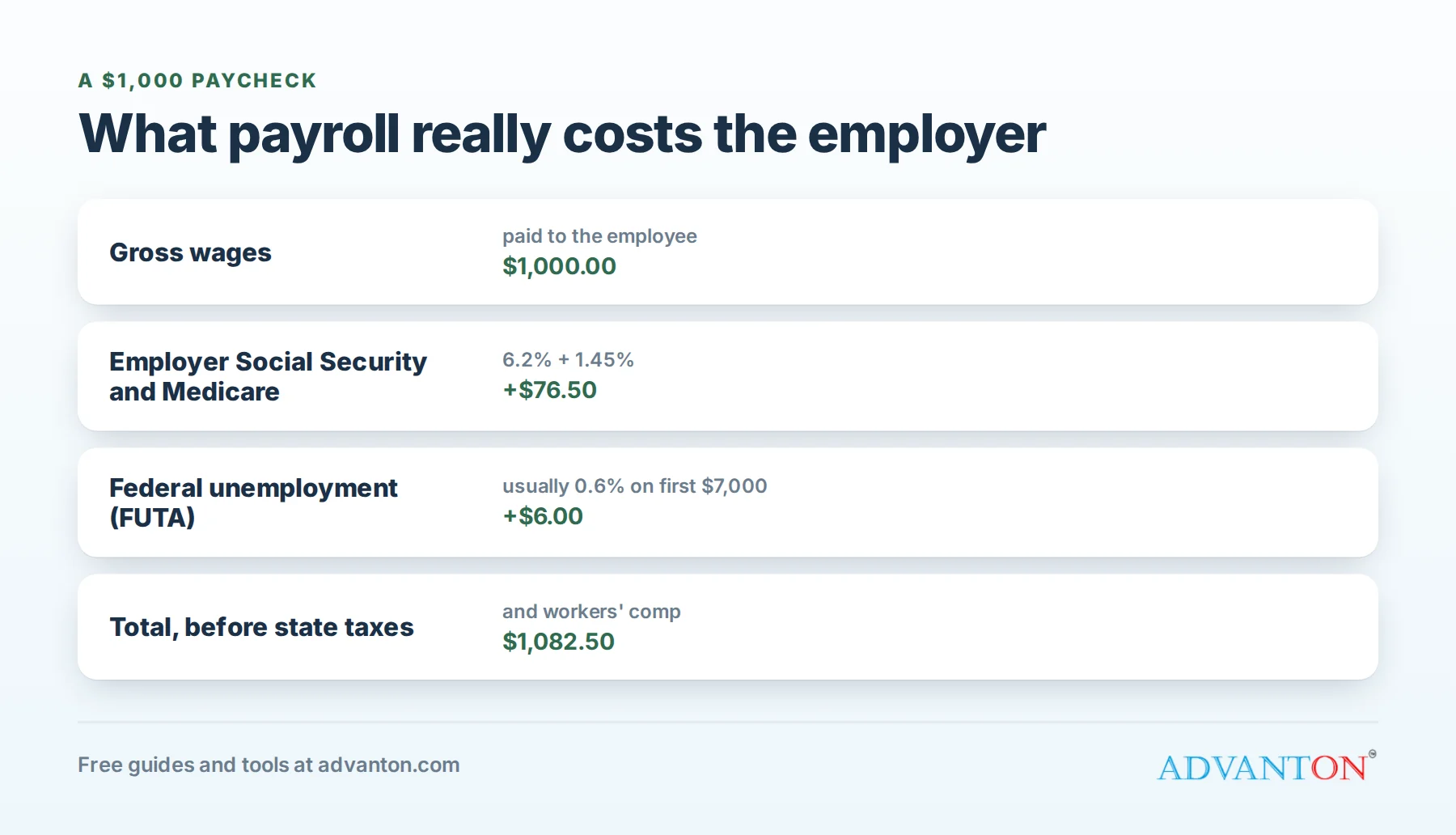
An employee earns $1,000 gross for a pay period:
- Social Security withheld: $62.00 (6.2%).
- Medicare withheld: $14.50 (1.45%).
- Federal and state income tax withheld: depends on the W-4 and state rules.
- Employer also pays: $62.00 Social Security, $14.50 Medicare, and usually $6.00 FUTA (0.6%, while the employee’s year-to-date wages are under $7,000), plus state unemployment tax.
So the true cost of $1,000 in wages is at least $1,082.50 before state unemployment tax and workers’ comp. Our hiring cost calculator adds it all up.
The free options, reviewed
1. Payroll4Free
Payroll4Free calculates payroll, prints checks and pay stubs, tracks paid time off and prepares federal forms, free for very small teams. Tax filing and deposits, and direct deposit, are paid add-ons; on the free tier, you file and deposit taxes yourself.
The catch: you remain responsible for deposits and filings, the interface is less polished than paid services, and free limits depend on team size.
Choose it if: you have a very small team and are comfortable handling tax deposits and returns.
2. HR.my
A free, ad-supported platform combining basic HR and payroll calculations.
The catch: limited support and US tax filing features; you’ll handle filings yourself.
Choose it if: you want free calculations and records for a tiny team.
3. TimeTrex open-source edition
Free, self-hosted software for payroll and time tracking.
The catch: you need technical skills to install, secure, update and back it up.
Choose it if: you have IT help and want full control.
4. Free government systems
- EFTPS (Electronic Federal Tax Payment System): free from the US Treasury for federal tax deposits.
- IRS Publication 15 (Circular E) and 15-T: free guides for withholding and employer responsibilities.
- SSA Business Services Online: free filing of W-2s and W-3s.
- Your state’s tax and labor agencies: online filing for state withholding and unemployment taxes.
These are essential whether you use free software or calculate payroll yourself.
Doing payroll yourself: a checklist
- Get an EIN and register with your state for withholding and unemployment tax.
- Collect Form W-4, Form I-9 and state forms from each employee.
- Report the new hire to your state.
- Set up EFTPS and your state’s online tax accounts.
- Each payday: calculate gross pay, withhold taxes and deductions, pay employees and record everything.
- Deposit taxes on your required schedule.
- File quarterly and annual returns on time.
- Issue W-2s and file with the SSA by January 31.
- Keep records of pay, hours and tax filings for the required periods.
How to pay employees
- Paper checks: simple, but slower and easier to lose.
- Direct deposit: the most common; free payroll tools often charge extra for it, or you can pay through your bank’s business payment tools.
- Pay cards: an option for employees without bank accounts; states have rules about fees and consent.
Many states set minimum pay frequencies, such as every two weeks for some workers, and rules for final paychecks. Check your state labor department’s rules.
A year-end checklist
- Confirm employee names, addresses and Social Security numbers.
- Reconcile total wages and taxes for the year with your quarterly returns.
- Issue W-2s to employees and file W-2s and W-3 with the SSA by January 31.
- File Form 940 for federal unemployment tax.
- File state annual reconciliations.
- Send 1099-NEC forms to contractors paid $2,000 or more in 2026.
- Update withholding tables and wage bases for the new year.
Keep good records
The IRS says to keep employment tax records for at least four years. Keep pay records, time records, W-4s, tax deposits, returns and copies of W-2s organized and backed up. Good records make filings easier and protect you in an audit or wage dispute.
State requirements
States add their own payroll rules: income tax withholding (in most states), unemployment insurance registration and quarterly reports, new hire reporting, minimum wage and overtime rules, paid sick leave in some states and cities, and sometimes disability or family leave insurance. Register with your state agencies before your first payday, and check local rules too.
An example payroll calendar
| When | Task |
|---|---|
| Every other Friday | Run payroll and pay employees |
| By the 15th of each month (monthly depositors) | Deposit last month’s federal payroll taxes |
| End of April, July, October, January | File Form 941 for the previous quarter |
| Quarterly | File state withholding and unemployment reports |
| By January 31 | W-2s to employees and SSA; Form 940; 1099-NECs |
Your actual deposit schedule depends on how much payroll tax you report; the IRS tells you which schedule applies.
The real cost of "free"
Free software saves the monthly fee, but you pay in time and risk:
- Your time each payday and at each filing deadline.
- Learning curve for tax rules and forms.
- Penalties: late deposits start at 2% and can reach 15%, plus interest and penalties for late filings.
- Employee trust: paycheck errors damage morale.
A worked example: free or paid?
A café owner has two part-time employees, paid every two weeks.
- Doing it with free software: about 1 hour each payday for calculations and records, plus 1 to 2 hours each month for deposits and 2 to 3 hours each quarter for returns, roughly 4 to 5 hours a month.
- A low-cost paid service: a monthly fee that includes automatic tax deposits, filings, direct deposit and W-2s.
If the owner values their time at $40 an hour, 4 to 5 hours a month is worth $160 to $200, likely more than a basic paid plan for two employees, and the paid service carries much less penalty risk. For many very small businesses, a low-cost paid service is the better deal once employees are on the books. Compare options and costs with our hiring cost calculator.
When free payroll makes sense
- One or two employees with simple pay.
- You’re comfortable with tax rules, deadlines and forms.
- You have time at each deadline.
- Your state’s filings are straightforward.
When to pay for payroll
- Three or more employees, or employees in more than one state.
- You want direct deposit and automatic tax filing.
- You’ve missed a deadline, or worry you might.
- You offer benefits or deductions.
- Your time is worth more than the fee.
Many paid services offer free trials; test a few before committing.
Questions to ask a paid payroll service
- What’s the full monthly cost for my number of employees, including add-ons?
- Do you file and deposit all federal and state taxes for me?
- Do you guarantee accuracy and cover penalties caused by your errors?
- Is direct deposit included, and how fast?
- Are year-end forms included?
- Can I run payroll from my phone, and how good is support?
Pair payroll with good HR habits
Accurate time tracking, organized employee records and clear policies make payroll easier. See our free HR software roundup for free tools covering scheduling, time clocks and records.
Common mistakes to avoid
- Misclassifying employees as contractors.
- Missing deposit deadlines.
- Forgetting state taxes and new hire reporting.
- Not keeping records.
- Paying employees in cash without payroll records.
Frequently asked questions
Is there completely free payroll software?
A few options offer free payroll calculations for very small teams, such as Payroll4Free, HR.my and open-source TimeTrex, but tax filing and direct deposit usually cost extra or must be done yourself.
Can I do payroll myself?
Yes, using IRS and state guidance and free systems like EFTPS. It requires time and care to meet every deadline.
What are the penalties for late payroll tax deposits?
IRS penalties start at 2% and can reach 15% depending on how late the deposit is, plus interest.
Do I need payroll if I’m the only person in my business?
Not as a sole proprietor taking owner draws. S corporation owners who work in the business must pay themselves a reasonable salary through payroll.
How often must I pay employees?
State laws set minimum pay frequencies for many workers; check your state labor department.
Can I switch from free payroll to a paid service mid-year?
Yes, but bring accurate year-to-date totals for each employee so W-2s and returns are correct; switching at the start of a quarter, or better still a new year, is easiest and cleanest.
Do I run payroll for family members who work in my business?
Usually yes, if they’re employees, though some tax rules differ. For example, wages a sole proprietor pays to their child under 18 are generally exempt from Social Security and Medicare taxes, and certain family employment is exempt from federal unemployment tax. Check IRS Publication 15 and ask a tax professional before relying on any exemption, since the rules depend on your business structure and the family member’s age.
Keep learning
Sources
- Fit Small Business, Best free payroll software (2026)
- Business.org, Best free payroll software for small businesses
- Homebase, Top free payroll apps for small business (2026), citing IRS Publication 15 penalties
Last reviewed October 28, 2026. Startup costs are estimates; check local prices, licensing and tax rules before you commit money.


Leave a Reply